So what are days off for? If you’re a geek like me, dorking around with build configurations, many libraries, package managers and multiple installs. All in the name of Rube Golderg!
So here was my goal: a Mac OS X Snow Leopard version of Python with the following modules:
- Pygame, for doing some interactive bit level graphics and animation
- Numpy, a high performance array package to enable complex bit level manipulations that can feed Pygame
- Pycairo, which is supposed to support 2D vector graphics on Numpy arrays
That’s not too much to ask is it? In theory, if it all comes together, I’m on my way to a processing style system with Python and more sophisticated bit level manipulations. Sort of like NodeBox plus a high end image processing substrate.
Of course Snow Leopard had to go and muck things up:
The trigger was Pygame. The current stable release isn’t ready for Apple’s new 64-bit world, including the system built-in Python.
No problem. I’ll just grab one of the pre-built Python’s from ActiveState or Python.org. They’re good old 32 bit, and in fact happily imported Pygame and ran various test scripts.
But since neither Python has Numpy or Pycairo built-in, I have to install them myself. virtualenv + pip? Strike one. easy_install? Strike two. Build from source? Strike three.
The first hurdle is that most of these guys need the old gcc-4.0 and the MacOS 10.4 Developer’s SDK. This takes a bit of beating your head against the default gcc on Mac OS: gcc-4.2. The trick is to set the following environment variables:
export CC=gcc-4.0 CXX=gcc-4.0 LD=gcc-4.0 ARCHFLAGS='-arch i386'
The first three environment variables downgrade to the old compiler while the latter ensures a build that’s compatible with the non-64-bit Python interpreters. That’s another really nasty issue, since Mac OS libraries can have all, some, or none of support for i386, powerpc, and x86_64 builds. If you mess up here you get cryptic linker errors, or even better bomb outs at module load time due to dynamic link errors.
After that, Numpy wasn’t too bad. I have to call out Pycairo as being a real bitch, though. The module depends on a bunch of libraries that are somewhat indiscriminately and inconsistently strewn amongst Apple’s old and new SDKs. Plus I had an install of MacPorts which made things even worse. Finally, Pycairo insists on using pkg-config to figure out where the libraries are, even if pkg-config is completely wrong. It was basically impossible to get a correct combination of library builds matched up to the right executable.
Bottom line, I wound up compiling a handful of essential libraries (pixman-1, cairo) for Pycairo by hand (with the above environment variables set) and sticking them in /usr/local/. That way I knew exactly how they were built and how to convince Pycairo where they were. This latter part involves
export PKG_CONFIG_PATH=:/usr/local/lib/pkgconfig
So now my three modules are all in one place. Yet to be determined is whether they actually work correctly.
 Yesterday I finished Margaret Atwood’s Oryx and Crake. Wow was that a great read! Simultaneously disturbing in the highly possible inhumanity and hubris on display yet delightful in the language play and satire. Oryx and Crake was one of the few books I’ve read recently that had laugh out loud moments.

 You know
 I
I 
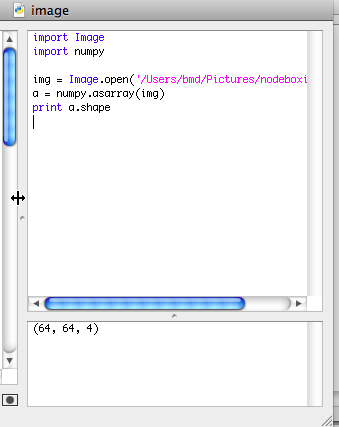 The image capture to the right is the result of my building the


 Looks like Apple is giving



 So Snow Leopard wasn’t supposed to break things, although of course a few items would get jostled along the way.
 ][1]
][1]

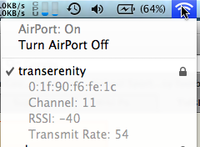 Learn something new every day. In MacOS X, if you click on the little AirPort menubar item while holding down the Option key, you get a ton more information about the network you’re connected to. That’s my home wireless basestation to the left over there. Hover over unconnected networks, wait a few seconds, and you’ll get more info as a tooltip.


 Built using